
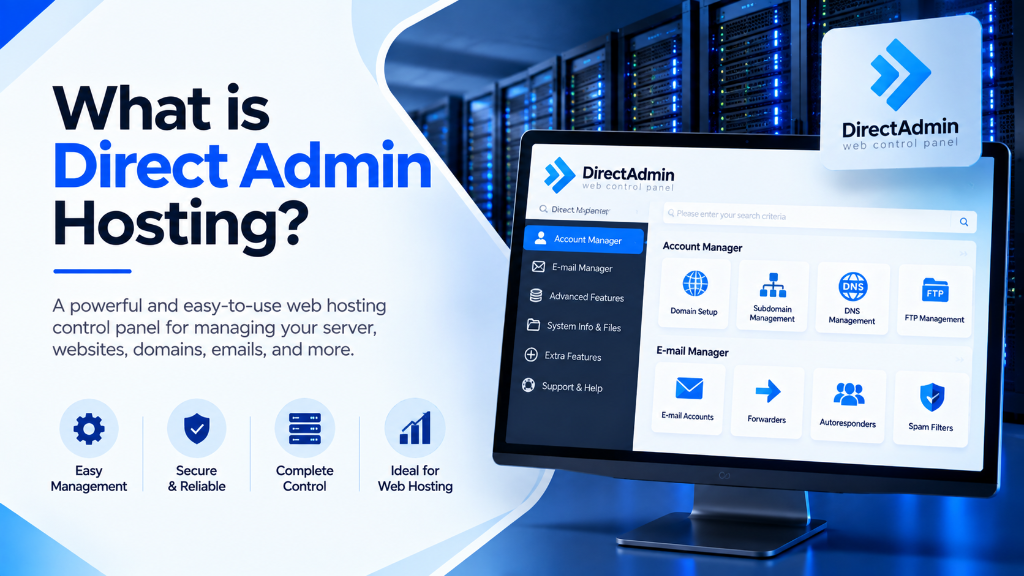
Deploying an enterprise Web Hosting from Onlive Infotech delivers hardware-isolated computing resources, enterprise PCIe Gen4 NVMe storage arrays, and multi-gigabit Tier-1 network uplinks. It provides scalable performance, deterministic I/O throughput, and complete administrative control with 99.9% uptime SLA.
Explore our flexible VPS hosting plans for flexible virtualization.
- High-Throughput Compute: Physical core reservations with zero hypervisor contention guarantee predictable application performance.
- PCIe Gen4 NVMe Arrays: High-IOPS solid-state storage accelerates database queries, caching layers, and web application response times.
- Enterprise Network Uplinks: Redundant carrier feeds and automated DDoS filtering preserve service continuity under intense traffic spikes.
Selecting a web hosting control panel directly influences server resource consumption, operational overhead, and overall website performance. In the web hosting industry, monolithic control panels frequently consume extensive system memory and CPU cycles running background service daemons before a single website visitor connects. For system administrators, web hosting providers, and digital agencies seeking an ultra-fast, resource-efficient hosting management platform, DirectAdmin Web Hosting delivers an enterprise-grade control panel engineered for maximum speed and simplicity. For mission-critical single-tenant workloads, deploy our enterprise dedicated server infrastructure with unshared physical compute. For organizations scaling high-throughput compute workloads, our scalable Linux VPS hosting solutions provides dedicated unmetered performance and enterprise hardware isolation.
Originally released in 2003, DirectAdmin has evolved into one of the most reliable and lightweight hosting control panels on the Linux operating system. Whether managing multi-tenant shared hosting on high-speed web hosting servers or administering isolated virtual instances on managed VPS hosting infrastructure, DirectAdmin provides complete administrative autonomy with minimal system overhead. This comprehensive architectural guide examines DirectAdmin hosting fundamentals, details the powerful CustomBuild 2.0 compiler engine, provides production Nginx and multi-PHP configurations, explores security hardening with CSF and ModSecurity, and compares DirectAdmin with cPanel and Plesk. When selecting a server administration interface, review our comprehensive Plesk vs cPanel control panel guide.
DirectAdmin Architectural Overview: Why Lightweight Engineering Matters
The defining technical distinction between DirectAdmin and competing control panels lies in its lightweight, compiled C++ software architecture. While panels like cPanel rely heavily on complex Perl and PHP abstraction layers, DirectAdmin runs as a compiled binary daemon (directadmin) that interacts directly with the Linux operating system kernel and filesystem APIs.
1. Minimal Baseline Memory and CPU Footprint
A fresh DirectAdmin installation consumes fewer than 50 MB to 100 MB of physical RAM at idle. In contrast, cPanel/WHM requires a baseline of 1 GB to 2 GB of memory simply to initialize its background service managers. This efficiency makes DirectAdmin ideal for entry-level VPS instances and high-density dedicated servers, leaving maximum computing resources available for application code, MySQL database caching, and web traffic processing.
2. The Three-Tier Administrative Hierarchy
DirectAdmin implements a streamlined, role-based access model that partitions server management into three clear functional tiers within a single unified web interface:
- Admin Level (Root Infrastructure Control): Grants system administrators complete authority over physical server services, IP allocation pools, DNS zone templates, CustomBuild software configurations, and security firewall policies.
- Reseller Level (Client and Account Provisioning): Enables web hosting resellers and digital agencies to create isolated user accounts, allocate bandwidth quotas, configure custom package limits, and manage brand white-labeling without accessing root operating system files.
- User Level (Domain and Application Management): Provides end-users and site owners with an intuitive interface to configure domain vhosts, create MySQL databases, issue Let’s Encrypt SSL certificates, set up email inboxes, and manage files via an integrated web file manager.
The CustomBuild 2.0 Engine: Automated Web Stack Compilation
The centerpiece of DirectAdmin’s technical versatility is CustomBuild 2.0. CustomBuild is an automated build and compilation tool located in /usr/local/directadmin/custombuild. It compiles, configures, and updates server software packages directly from source code or verified repositories, granting administrators complete control over every component in the web hosting stack.
1. Selecting the Web Server Architecture
CustomBuild supports multiple high-performance web server topologies. Administrators can toggle between standard Apache, standalone Nginx, hybrid Nginx-reverse-proxy with Apache, or high-throughput OpenLiteSpeed with a single configuration command:
Deploying the nginx_apache topology combines Nginx’s ability to serve static assets directly from memory with Apache’s flexibility in interpreting local .htaccess rewrite directives, delivering superior e-commerce performance without breaking legacy website configurations.
2. Multi-PHP Version Management
Modern web agencies host diverse client applications that require different PHP runtime versions. DirectAdmin allows administrators to install up to four separate PHP versions concurrently, assigning specific versions per domain name through the User interface:
Each PHP version runs in dedicated PHP-FPM (FastCGI Process Manager) pools isolated under individual Linux system user accounts, preventing cross-account script access and ensuring complete security separation.
Production CustomBuild options.conf Configuration Blueprint
CustomBuild’s operational parameters are stored in /usr/local/directadmin/custombuild/options.conf. Below is a production-hardened configuration optimized for speed, stability, and security:
Enabling brotli=yes and opcache=yes in CustomBuild ensures that all compiled PHP and Nginx binaries natively support modern asset compression and in-memory bytecode caching right out of the box.
Enterprise Mail Server Architecture: Exim, Dovecot, and Anti-Spam Protection
One of the most persistent operational challenges in multi-tenant web hosting is mail server administration and email deliverability. A single compromised WordPress account sending outbound spam can cause a hosting server’s public IP address to be blacklisted across major Real-time Blackhole Lists (RBLs) like Spamhaus, Barracuda, and SORBS. DirectAdmin integrates an enterprise-grade mail stack centered around Exim MTA and Dovecot IMAP/POP3, hardened with automated outbound abuse mitigation modules.
1. Mitigating Outbound Spam with BlockCracking and Easy Spam Fighter
CustomBuild provides native plugins designed to identify and quarantine outbound spam scripts in real time before emails leave the local mail queue:
BlockCracking analyzes outbound authentication patterns, immediately blocking authenticated SMTP sessions that attempt to send excessive email volumes over short intervals. Easy Spam Fighter evaluates incoming and outgoing messages against SPF, DKIM, DMARC, and DNSBL records directly at the SMTP connection stage, rejecting unverified mail before it reaches the mail storage spool.
2. Automated DKIM and SPF Record Generation
DirectAdmin automates DomainKeys Identified Mail (DKIM) cryptographic signing. When an administrator enables DKIM, DirectAdmin generates 2048-bit RSA keypairs for each hosted domain and automatically updates local DNS zone files with corresponding public TXT records:
Automated Off-Site Backups and Disaster Recovery Automation
DirectAdmin features a resilient backup architecture executed asynchronously through an internal task queue (/usr/local/directadmin/data/task.queue). Unlike legacy panels that lock web server resources during multi-gigabyte compression routines, DirectAdmin offloads compression tasks to background worker threads, minimizing impact on active web visitors.
1. Scheduling Off-Site Automated Backups via Admin Backup/Transfer
Through the Admin Backup/Transfer utility, administrators can schedule automated nightly or weekly backup routines that stream compressed archives directly to remote storage targets over secure SFTP, FTP, or S3-compatible cloud object storage:
DirectAdmin creates individual per-user tarball archives containing domain vhosts, public_html files, MySQL database dumps, user cron jobs, email accounts, and SSL certificates. Restoring an entire customer account requires only placing the archive in the restore directory and issuing an automated restore command.
3. Automated DNSSEC Cryptographic Signing
Domain Name System Security Extensions (DNSSEC) protect websites against DNS spoofing and cache poisoning attacks by cryptographically signing DNS zone records. DirectAdmin natively integrates DNSSEC key generation and automatic zone signing through the BIND DNS server daemon. When an administrator activates DNSSEC for a domain, DirectAdmin automatically creates Zone Signing Keys (ZSK) and Key Signing Keys (KSK), outputting the required DS (Delegation Signer) records for domain registrars:
Implementing DNSSEC ensures that recursive DNS resolvers around the globe verify the authenticity of IP routing records, preventing malicious man-in-the-middle redirection of e-commerce and banking clients.
Enterprise Security Hardening in DirectAdmin Hosting
Securing a multi-tenant web hosting server against unauthorized access, brute-force attacks, and malicious script uploads requires an integrated defense strategy.
1. ConfigServer Security & Firewall (CSF/LFD) Integration
DirectAdmin integrates with ConfigServer Security & Firewall (CSF) and the Login Failure Daemon (LFD). CSF provides advanced stateful packet inspection (iptables/nftables), port management, and automated IP temporary/permanent bans when repeated failed login attempts occur across SSH, DirectAdmin (port 2222), FTP, or IMAP:
2. ModSecurity Web Application Firewall (WAF) with OWASP Core Rule Set
CustomBuild allows administrators to deploy ModSecurity 3.x combined with the OWASP Core Rule Set (CRS). This inspects incoming HTTP/HTTPS traffic at the web server layer, blocking SQL injection attempts, Cross-Site Scripting (XSS), and remote file inclusions before malicious requests ever reach application PHP scripts:
3. Automated Free SSL via Integrated Let’s Encrypt
DirectAdmin includes native, automated Let’s Encrypt SSL/TLS provisioning. Users can request single-domain, multi-domain, and wildcard SSL certificates directly from their dashboard. DirectAdmin’s background cron service automatically validates ACME challenges and renews certificates 30 days prior to expiration without requiring manual administrator intervention.
DirectAdmin vs. cPanel vs. Plesk: The Enterprise Comparison
Evaluating DirectAdmin against industry legacy platforms highlights significant differences in resource utilization, licensing economics, and architectural flexibility:
| Evaluation Metric | DirectAdmin | cPanel / WHM | Plesk Obsidian |
|---|---|---|---|
| Idle Memory Usage | 50 MB – 100 MB | 1 GB – 2 GB | 800 MB – 1.5 GB |
| Licensing Model | Fixed Flat-Rate / Unlimited Accounts | Per-Account Surcharges (Expensive) | Domain Tiered Pricing |
| Web Server Options | Apache, Nginx, Nginx+Apache, OLS | Apache, Nginx (Basic), EA4 | Apache, Nginx Reverse Proxy |
| Build & Update Tool | CustomBuild 2.0 (Direct Source) | EasyApache 4 (RPM Packages) | Plesk Installer (Modular Packages) |
| Native CLI Control | Extensive CLI via ./build |
WHM API1 / API2 scripts | Plesk CLI utilities |
| Backup & Migration | Native format + cPanel to DA restore | Proprietary cpmove archives | Plesk XML backup archives |
Following industry licensing increases across legacy control panels, DirectAdmin’s predictable, flat-fee licensing and lightweight resource consumption have made it the premier choice for cost-conscious, high-performance hosting providers.
Step-by-Step Server Administration and Maintenance Runbook
Maintaining a DirectAdmin server requires minimal administrative overhead when following standardized CLI routines:
- Perform Routine Software Updates: Update system packages and CustomBuild source definitions:
- Verify Server Services Status: Check the status of core service daemons via systemd:
- Automated Full Server Backups: Schedule automated off-site backups via Admin Backup/Transfer in the web panel or trigger immediate backups via CLI:
- Rebuilding Virtual Host Configurations: If web server configuration templates are customized, regenerate all virtual host files instantly:
Frequently Asked Questions
Q:
What is DirectAdmin hosting and how does it work?
Q:
Can I migrate cPanel website backup archives directly into DirectAdmin?
Q:
What are the minimum server requirements to run DirectAdmin?
Q:
What Linux distributions are supported by DirectAdmin?
Q:
What is CustomBuild in DirectAdmin?
Infrastructure Decision Framework: Choosing Your Deployment
Balancing low latency transit, dedicated hardware isolation, and predictable operating costs ensures long-term performance stability for enterprise applications.
Deploy high-performance scalable VPS hosting solutions equipped with enterprise NVMe storage arrays, redundant network uplinks, and 24/7 expert engineering support from Onlive Infotech.
For streamlined domain management and server configuration across multi-tenant environments, refer to our comprehensive Plesk vs cPanel hosting control panel guide.
•

✓
