
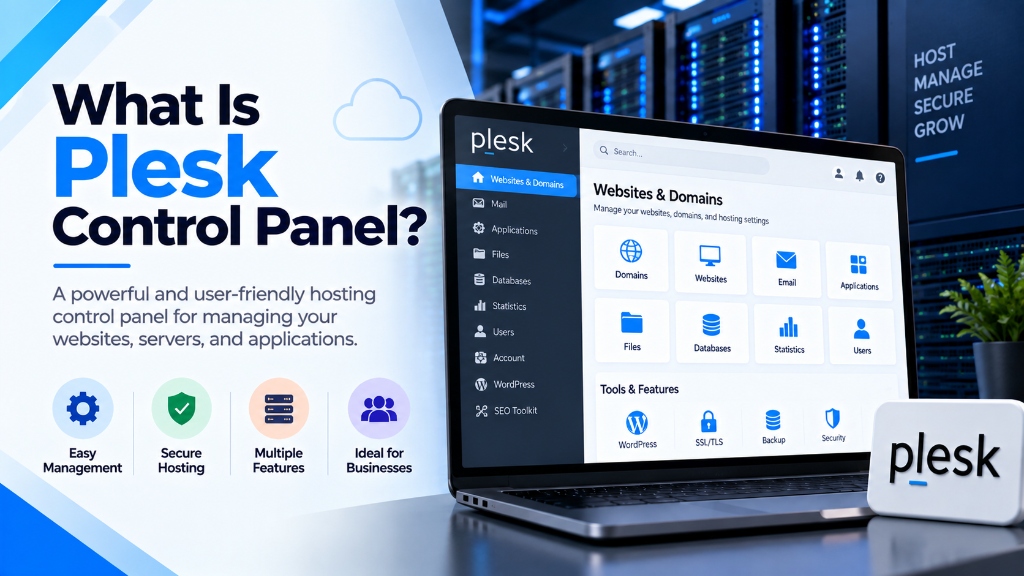
Selecting a web hosting control panel dictates administrative automation, client provisioning workflows, and resource governance. Whether deploying cPanel & WHM for commercial reseller hosting with CloudLinux LVE isolation, or Plesk Obsidian for multi-tier agency development with native Docker, Git webhooks, and Windows Server support, choosing the right platform eliminates management overhead.
Explore our flexible VPS hosting plans for flexible virtualization.
- Workflow Automation: Native API integration with WHMCS for zero-touch account creation, quota scaling, and billing suspension.
- Multi-Tenant Isolation: Strict permission boundaries and resource controls protect parent server stability from individual tenant spikes.
- Operating System Alignment: Choose cPanel for Enterprise Linux or Plesk for dual Linux/Windows hybrid environments.
Administering modern hosting environments requires managing web server daemons, database instances, secure mail routing, DNS zones, and cryptographic certificates across physical servers and virtual machines. While traditional command-line management remains viable for single-purpose servers, managing multi-tenant client sites, complex staging environments, and containerized microservices introduces administrative friction. In the commercial server management market, Plesk Obsidian is one of the most versatile and widely deployed hosting platforms in the world. For mission-critical single-tenant workloads, deploy our enterprise web hosting services with unshared physical compute. For organizations scaling high-throughput compute workloads, our scalable Linux VPS hosting solutions provides dedicated unmetered performance and enterprise hardware isolation.
Maintained under the WebPros portfolio alongside cPanel, Plesk distinguishes itself through a cross-platform architecture that runs natively on both Linux enterprise distributions and Microsoft Windows Server. With a modular microservice web engine, deep developer integrations (Git, Docker, Node.js), native WordPress Toolkit management, and automated self-healing diagnostic tools, Plesk serves digital agencies, development teams, and enterprise hosting providers. This technical guide examines Plesk’s underlying architecture, operating system compatibility, installation procedures, command-line administration, and security hardening. When selecting a server administration interface, review our comprehensive Sentora open-source control panel deployment guide.
Underlying Architecture: Modular Engine and Subscription Hierarchy
To evaluate Plesk’s capabilities, systems architects must examine how it processes configuration updates and structures administrative authority.
1. The Modular Web Engine (sw-cp-server and sw-engine)
Unlike control panels that rely on external Apache or Nginx daemons to serve their management consoles, Plesk operates on dedicated, isolated microservices:
- sw-cp-server: A specialized, hardened Nginx-based web daemon that listens on TCP port 8443, handling transport layer security (TLS) natively.
- sw-engine: A custom PHP-based execution engine that processes internal panel requests, executes API commands, and runs background maintenance tasks without interfering with the server’s public application PHP runtimes.
This isolation ensures that if an end user’s website crashes public Apache or PHP-FPM processes, the Plesk management console remains fully accessible. Plesk also maintains its internal state within an optimized relational database (SQLite on smaller instances or a dedicated MySQL/MariaDB instance), allowing rapid metadata queries and automated transaction rollbacks during configuration failures.
2. Administrative Hierarchy: Service Provider View vs. Power User View
Plesk solves the multi-tenancy challenge by offering dynamic interface views tailored to specific operational models:
- Service Provider View: Geared toward commercial hosting providers and resellers. It structures management into customers, reseller tiers, service plans, and subscription packages. Each subscription defines rigid resource boundaries (disk quotas, bandwidth limits, maximum databases, and PHP memory limits).
- Power User View: Tailored for digital agencies, software developers, and single-tenant VPS owners. It places websites, staging environments, Git repositories, and application logs at the center of the interface, eliminating reseller billing overhead.
Cross-Platform Compatibility: Linux and Windows Server
Plesk’s defining architectural advantage over competing control panels is its true cross-platform capability.
1. Linux Enterprise Deployments
On Linux (supporting Ubuntu, Debian, AlmaLinux, Rocky Linux, and RHEL), Plesk deploys an event-driven Nginx reverse proxy in front of Apache. Nginx serves static assets directly from disk, while Apache processes dynamic PHP requests via php-fpm pools. For high-concurrency environments, Plesk permits disabling Apache completely on a per-domain basis, running websites in Pure Nginx Standalone Mode to minimize memory usage on Linux VPS hosting instances.
2. Windows Server Deployments
Plesk is the industry-standard hosting panel for Microsoft Windows Server (2016, 2019, 2022). Rather than attempting to emulate Linux environments, Plesk integrates directly with native Windows subsystems:
- Internet Information Services (IIS): Manages IIS application pools, virtual directories, HTTP bindings, and web.config rules natively.
- ASP.NET and .NET Core: Provides one-click switching between multiple .NET Framework and modern .NET Core runtimes.
- Microsoft SQL Server: Manages local and remote MSSQL database instances, user logins, and automated database backups alongside MySQL.
For organizations operating enterprise .NET applications alongside PHP websites on dedicated servers, Plesk provides a unified management control plane across heterogeneous operating system environments.
Step-by-Step Installation Walkthrough
Plesk requires a fresh, minimal operating system installation with no pre-existing web servers or database packages.
Installing Plesk on Linux (Ubuntu / AlmaLinux)
Connect to your server via SSH as the root user and execute the automated one-click installer:
The installer automatically detects your operating system, configures official software repositories, installs necessary web daemons, and prepares the Plesk database. Upon completion, the terminal displays a one-time administrative login URL containing an encrypted security token:
Open the URL in your web browser, configure your master administrator credentials, apply your license key, and complete initial setup.
Silent CLI Installation on Windows Server
On Windows Server, launch an administrative PowerShell terminal and execute the silent installer:
Granular PHP Handler Selection and Pool Tuning
Modern web applications require different PHP versions and handler types. Plesk installs multiple PHP versions (from PHP 7.4 through PHP 8.3) out of the box. Within each subscription’s PHP settings, systems administrators can select between: To achieve balanced multi-instance agility and cost efficiency, pair your deployment with enterprise dedicated server infrastructure featuring high-speed NVMe storage arrays.
- Dedicated FPM application served by Apache: Apache receives the request, processes
.htaccessdirectives, and routes PHP execution to a dedicated PHP-FPM pool running under the domain’s system user account. - Dedicated FPM application served by Nginx: Bypasses Apache completely, routing requests directly from Nginx to the PHP-FPM UNIX socket. This configuration delivers the highest performance and lowest memory consumption for static-heavy or API workloads.
- FastCGI application: A legacy process manager maintained primarily for backward compatibility with older web scripts.
Administrators can customize individual PHP directives (such as memory_limit, upload_max_filesize, max_execution_time, and opcache.enable) on a per-domain basis directly through the web interface without altering system-wide php.ini configuration files.
Command-Line Management and Self-Healing Tools
Plesk includes comprehensive command-line utilities located in /usr/local/psa/bin/ (Linux) or %plesk_bin% (Windows), allowing systems administrators to automate tasks without opening the GUI.
1. Provisioning Domains and Web Configurations via CLI
2. The Plesk Self-Healing Engine (plesk repair)
One of Plesk’s most valuable systems engineering utilities is the built-in Plesk Repair Tool. If an administrator accidentally corrupts an Apache configuration file, breaks file permissions, or disrupts mail routing, the repair utility diagnoses and resolves inconsistencies automatically:
Developer Tooling: Git, Docker, and the WordPress Toolkit
Plesk Obsidian is tailored to accelerate web development and deployment workflows.
1. Native Docker Container Management
Plesk includes a graphical Docker management extension. Administrators can search the Docker Hub repository, pull verified container images, map container ports to host interfaces, configure persistent storage volume mounts, and set environment variables directly from the panel. This makes running containerized auxiliary services (such as Redis caching, RabbitMQ message brokers, or Elasticsearch) straightforward without managing standalone orchestrators.
2. Git Repository Integration and Automated CI/CD
Developers can connect remote Git repositories (GitHub, GitLab, Bitbucket) directly to Plesk subscriptions. Whenever code is pushed to a designated branch, Plesk executes automated post-receive deployment actions, such as running Composer updates, installing NPM packages, or triggering database migrations.
3. The WordPress Toolkit
Plesk’s flagship feature is the WordPress Toolkit, an enterprise-grade WordPress management suite providing:
- 1-Click Staging and Synchronization: Clone a production website to an isolated staging subdomain, test core or plugin updates, and merge database or file changes back to production without manual export/import steps.
- Smart Updates: Uses AI visual regression testing to clone your active website, apply plugin updates, compare before-and-after visual screenshots, and test HTTP response codes. If anomalies are detected, the update is halted, preventing customer-facing downtime.
- Automated Security Hardening: Audits WordPress installations against security benchmarks, restricting directory indexing, disabling XML-RPC pingbacks, enforcing secure file permissions, and blocking sensitive files with a single toggle.
Security Architecture and Server Defense Mechanisms
Plesk provides a multi-layered security suite designed to protect hosting environments against brute-force attacks, malware, and application-layer vulnerabilities.
1. Plesk Advisor
Plesk Advisor is a centralized security and performance auditing dashboard that evaluates server configurations against industry best practices. It checks TLS protocol settings, identifies missing firewall rules, audits password complexity policies, and provides 1-click remediations to bring servers into compliance with security benchmarks.
2. Integrated Fail2ban and ModSecurity
Plesk integrates Fail2ban natively into its web console, providing pre-configured jails for SSH, Plesk logins, Apache, Nginx, Postfix, Dovecot, and ProFTPD. When clients exceed authentication failure limits, Fail2ban dynamically inserts temporary drop rules into the firewall.
For application-layer protection, Plesk manages ModSecurity web application firewall rules natively. Administrators can select between the open-source OWASP Core Rule Set (CRS) or commercial rulesets (such as Atomic Basic or Comodo) to inspect incoming HTTP payloads for SQL injection, cross-site scripting, and remote file inclusion attacks.
Licensing Tiers: Edition Comparison
Plesk licenses are structured around domain capacity tiers rather than incremental per-account billing:
| Plesk Edition | Domain Limit | Target Audience | Included Core Features |
|---|---|---|---|
| Web Admin Edition | Up to 10 domains | Small businesses, single-purpose VPS | Basic web and mail management, WordPress Toolkit SE |
| Web Pro Edition | Up to 30 domains | Digital agencies, freelance web developers | Full WordPress Toolkit, Developer Pack, Subscription management |
| Web Host Edition | Unlimited domains | Commercial web hosts, resellers, large enterprises | Full WordPress Toolkit, Developer Pack, Reseller management tiers |
Common Pitfalls in Plesk Server Administration
Avoiding these critical administrative errors preserves server stability and security:
- Manually Editing Generated Virtual Host Files: Plesk generates virtual host files from internal configuration templates located in
/usr/local/psa/admin/conf/templates/. If you manually edit an Apache or Nginx virtual host in/var/www/vhosts/system/domain.com/conf/, Plesk will overwrite your manual edits during the next configuration rebuild. Always use the Additional Nginx Directives box in the panel GUI or create custom configuration templates. - Running Heavy Extensions on Under-Resourced VPS Slices: Installing memory-intensive extensions (such as Imunify360, full Docker stacks, and ClamAV) on a VPS with less than 2 GB of RAM will trigger kernel Out-Of-Memory (OOM) crashes. Ensure your VPS possesses at least 4 GB of RAM when running enterprise security extensions.
- Neglecting Automated Remote Backups: Plesk includes an automated backup manager that exports server configurations, customer subscriptions, databases, and mail accounts. Storing backups strictly on local disks creates disaster recovery risks; always configure automated remote backups to offsite SFTP storage or Amazon S3-compatible cloud object storage.
- Leaving Port 8443 Open to Public Scanning Without Fail2ban: Automated botnets scan port 8443 continuously searching for unpatched Plesk consoles. Ensure the built-in Fail2ban
plesk-loginjail is active, or restrict port 8443 access to authorized administrative IP ranges using the Plesk Firewall extension.
Frequently Asked Questions
Q:
Which control panel is better for web hosting, cPanel or Plesk?
Q:
Can I migrate existing websites from cPanel to Plesk without data loss?
Q:
What operating systems support modern web hosting control panels?
Q:
How does a control panel simplify multi-tenant account isolation?
Q:
Is root administrative access required to install and manage a control panel?
Q:
What automated backup mechanisms are integrated into hosting control panels?
Infrastructure Decision Framework: Choosing Your Deployment
Balancing low latency transit, dedicated hardware isolation, and predictable operating costs ensures long-term performance stability for enterprise applications.
Deploy high-performance scalable VPS hosting solutions equipped with enterprise NVMe storage arrays, redundant network uplinks, and 24/7 expert engineering support from Onlive Infotech.
For streamlined domain management and server configuration across multi-tenant environments, refer to our comprehensive Plesk vs cPanel hosting control panel guide.
•

✓
